

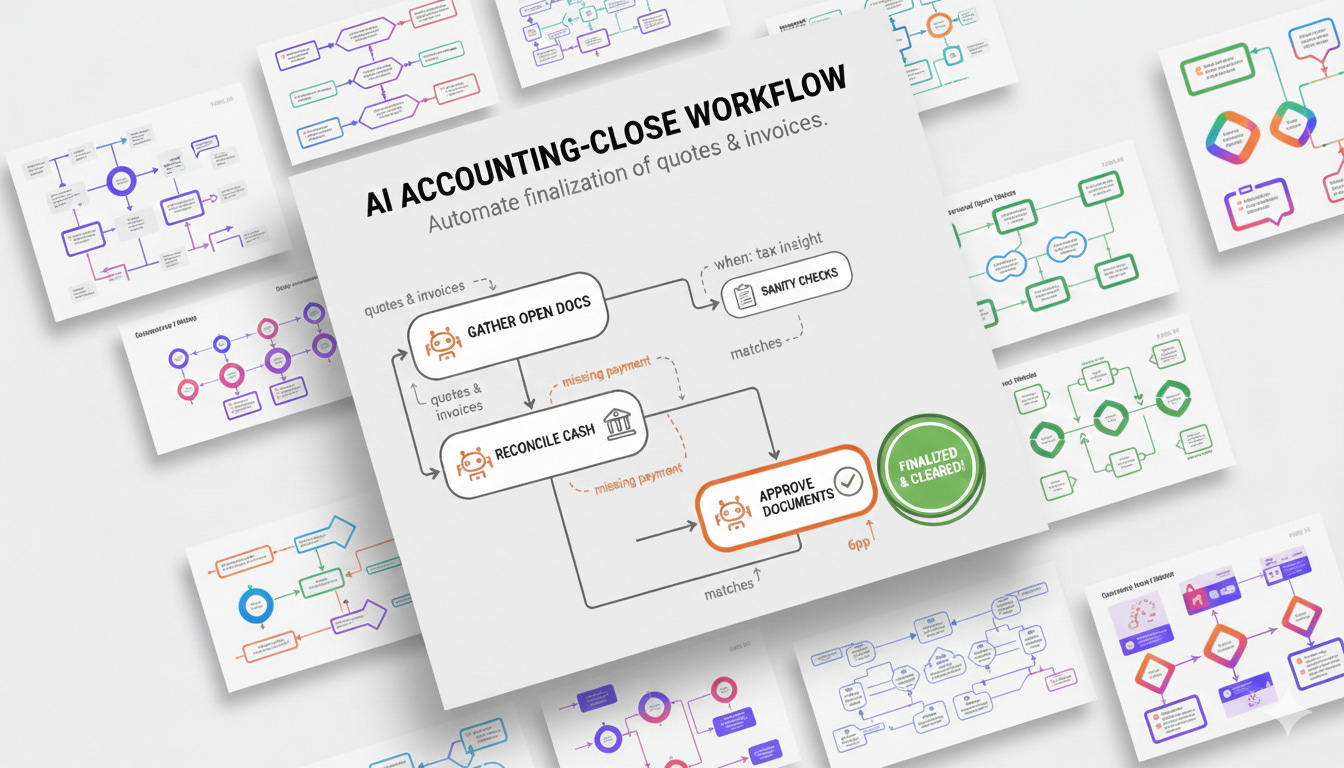
We keep being told how much everybody loves the bridge’s no-code UI generation, but the truth is that most real-world operators don’t need just a single screen, they need a guided, repeatable sequence of steps that respects approvals, reroutes when something changes, and keeps everyone in sync. Workflows brings that capability to the next release: it is the missing layer between a set of tools, a generated UI and a polished process.
To tell the story, let’s use something every accountant recognizes - Let’s say we have something like a good old NetSuite running, with their AI connector service that exposes a set of tools. A single operator should be able to review open quotes, check whether the matching invoices exist, verify cash actually hit the bank, and then approve both documents, all without leaving the bridge. Workflows takes that intent and turns it into a reusable runbook.
Scene 1: Describe the mission
You start with a root_intent, think of it as the mission statement. For accounting it’s “Close out open quotes and invoices with cash confirmation.” The bridge reads the workflow JSON, loads the MCP tool schemas, and lets the routing agent orchestrate the sequence. Here’s a condensed definition that lives next to your generated UI:
{
  "flow_id": "accounting-close",
  "root_intent": "Finalize quotes and invoices once cash clears",
  "agents": [
    {
      "name": "gather.open_docs",
      "description": "List all open quotes and invoices for the selected organisation.",
      "tools": [
        "list-organisation-details",
        "list-quotes",
        "list-invoices",
        "list-items"
      ],
      "returns": ["quotes", "invoices"]
    },
    {
      "name": "reconcile.cash",
      "description": "Match invoices to incoming bank transactions.",
      "tools": [
        "list-bank-transactions",
        "list-payments",
        "list-trial-balance"
      ],
      "context": ["gather.open_docs.quotes", "gather.open_docs.invoices"]
    },
    {
      "name": "sanity.checks",
      "description": "Verify compliance inputs such as tax rates and payroll exposure.",
      "tools": [
        "list-tax-rates",
        "list-accounts",
        "list-payroll-employees",
        "list-credit-notes"
      ],
      "when": "need tax insight"
    },
    {
      "name": "approve.documents",
      "description": "Show the user the quotes and invoices and the generated approval screen snippet, and ask to approve quotes and invoices.",
      "tools": [],
      "context": ["reconcile.cash.matches"],
      "reroute": [
        { "on": "missing_payment", "to": "reconcile.cash" }
      ]
    }
  ]
}
And then, all that’s left is to kick off the flow with a simple API call that includes the use_workflow parameter and the start_with agent to set the context:
curl -X POST <http://localhost:8000/tgi/v1/chat/completions> \\
  -H "Authorization: Bearer $TOKEN" \\
  -H "Content-Type: application/json" \\
  -H "Accept: text/event-stream" \\
  -d '{
    "model": "gpt-4o",
    "messages": [{"role": "user", "content": "Close the open quotes for ACME Ltd"}],
    "use_workflow": "accounting-close",
    "start_with": {
      "args": {"organisation_id": "acme-ltd"},
      "agent": "gather.open_docs"
    }
  }'
Scene 2: The agents take the stage
gather.open_docscallslist-organisation-details,list-quotes, andlist-invoices. While it streams over SSE you literally watch the open quotes appear in the UI your team already generated.reconcile.cashcompares each invoice againstlist-bank-transactionsandlist-payments. If it can’t find a match it emits<reroute>missing_payment</reroute>and the routing agent loops the operator back with the right context instead of guessing.sanity.checkspullslist-tax-rates,list-credit-notes,list-accounts, andlist-payroll-employeesonly when the routing agent judges the context needs extra scrutiny, for example when invoices include payroll or cross-border tax items.approve.documentscallsapprove-quoteandapprove-invoicefor every reconciled pair. If a stakeholder wants to pause, the agent adds<user_feedback_needed>and the workflow waits for a human confirmation before running the approvals again with the sameworkflow_execution_id.
Each agent only sees the context it needs. You can mask sensitive data, thread audit metadata, or have an agent run “headless” by setting context: false. Everything that matters, reroute reasons, human feedback, structured returns like <return name="reconcile.cash.matches">[...]</return>, is stored so you can replay the exact path later.
Scene 3: The happy ending
In enterprises the obstacle is never a lack of APIs. It’s the handoffs between them. Workflows shows up where the bridge already proved itself: you use the same accounting MCP server, OAuth boundaries, design prompts, and SSE channels, but now the bridge owns the sequence too. Your accounting lead describes the process in plain English, the bridge renders both the UI and the workflow, and the ops team gets an auditable, repeatable automation without scheduling a build sprint.
You can find the latest release on our github page inxm-ai/enterprise-mcp-bridge!
The fine print: limitations and what comes next
These workflows are powered by lightweight JSON definitions and LLM prompts, and that comes with trade-offs:
Syntax is explicit: you still define agents,
whenclauses, reroutes, and argument mappings in JSON. It’s far friendlier than writing code, but it isn’t a drag-and-drop canvas.Interruptions pause the flow but don’t insert retries or circuit breakers automatically. If an agent hangs or returns bad data, you either rerun or craft a reroute path; there’s no built-in “retry three times” primitive.
Long-running workflows rely on persisted event logs; there’s no distributed queue, SLA enforcement, or programmable backoff policies.
Error handling is human-readable but it’s not the deterministic state machine you might expect from your BPM suite.
This is very heavy on LLM judgment calls. In a real deployment, would you really trust an AI to decide when tax compliance checks are needed? Probably not without guardrails.
This is only for single MCP servers. You can’t orchestrate across multiple systems of record in one flow.
If you need an automation you can trust with regulated processes, want contract-level guarantees, or prefer creating a plan without learning json, that’s exactly what our core INXM platform delivers.
The bridge workflows are meant to be the on-ramp: you prototype intent with natural language, close the loop with single MCP tools, and when it’s time to industrialize the flow, combine multiple MCP servers with integrated scalable runtime, you graduate to INXM’s production-grade workflow engine, no rewriting required, just a handoff to the platform that was built for predictable orchestration from day one.
Because as Kamil said: Enterprise AI does not fail because of missing intelligence. It fails because it lacks enterprise grade cognitive orchestration.